

Most healthcare organizations treat HIPAA authorization forms as a one-at-a-time administrative task — print one, stuff an envelope, mail it out. That works until you're running a clinical research study, processing records requests for hundreds of patients, or managing a multi-site practice. At that point, the manual process becomes a liability: slow, error-prone, and often non-compliant in ways that don't surface until a breach investigation.
This guide is for the compliance officers, billing managers, and practice administrators who need to send HIPAA authorization forms by mail at any scale — and need to do it right.
Table of Contents
- What Is a HIPAA Authorization Form?
- When Must You Send the Form by Physical Mail?
- What HIPAA Requires in the Mailing Process
- Privacy Safeguards for Mailing PHI
- Building a Compliant Mailing Workflow
- Scaling Authorization Form Mailings with WriteToMail
- Common Compliance Mistakes to Avoid
- FAQ
- Sources
What Is a HIPAA Authorization Form?
A HIPAA authorization form is a written consent document that allows a covered entity — a hospital, clinic, health plan, or healthcare clearinghouse — to use or disclose a patient's protected health information (PHI) for purposes that fall outside of routine treatment, payment, or healthcare operations.
Under 45 CFR § 164.508, HHS requires that a valid authorization include:
- A specific description of the PHI to be used or disclosed
- The name or class of persons authorized to make the disclosure
- The name or class of persons to whom the disclosure may be made
- A description of each purpose of the requested use or disclosure
- An expiration date or event
- The patient's signature and date
Authorization is distinct from the Notice of Privacy Practices, which is a separate document with its own distribution requirements. You can read more about that in our guide on how to send a HIPAA Notice of Privacy Practices by mail.
The form is required in specific, defined scenarios — marketing communications, research studies involving PHI, disclosures to employers, sale of PHI, and psychotherapy notes disclosures. Without a valid, signed authorization, these disclosures constitute a HIPAA violation.
When Must You Send the Form by Physical Mail?
Email is fast and convenient, but it carries real HIPAA risk. Unencrypted email is not a secure transmission method under HIPAA, and even with encryption, email delivery doesn't create a reliable paper trail in the way physical mail does.
Physical mail is the appropriate channel in several situations:
The patient prefers mail. Under HIPAA's right of access rules, patients can request their preferred communication method. If a patient has indicated they want correspondence by mail, you must honor that preference.
You cannot confirm secure email delivery. If your organization lacks a patient portal or encrypted messaging system, physical mail is the safer default.
Legal or regulatory proceedings require documented delivery. Physical mail — particularly certified mail — creates a delivery record that email cannot replicate.
The patient population is elderly or rural. Pew Research data shows that internet access rates among adults 65 and older significantly trail younger demographics. Many patients simply don't use email reliably.
You're managing large-scale records requests. When a records request affects many patients simultaneously — a data migration, a practice acquisition, a research study — mailing physical authorization forms is often the only operationally feasible approach that doesn't create compliance gaps.
Physical mail also carries an implicit professionalism signal. Patients take mailed documents more seriously than emails, which often go unread or land in spam filters. USPS research on mail engagement has consistently shown that physical mail generates higher open rates and response rates than email for healthcare communications.
What HIPAA Requires in the Mailing Process
Sending a HIPAA authorization form by mail isn't just about getting the form content right. The mailing process itself must be handled in a compliant manner.
The Minimum Necessary Standard
45 CFR § 164.502(b) requires covered entities to make reasonable efforts to limit PHI to the minimum necessary to accomplish the intended purpose. Applied to authorization form mailings, this means you should not include more PHI in the envelope than the authorization form itself requires.
Don't staple a patient's full medical record to an authorization form requesting disclosure of a single diagnosis. The envelope should contain exactly what's needed — no more.
Business Associate Agreements
If you use a third-party vendor to print and mail your authorization forms, that vendor becomes a Business Associate under HIPAA. You must have a signed Business Associate Agreement (BAA) with them before any PHI is transmitted.
This is a non-negotiable requirement. Skipping a BAA with your mail vendor is a direct HIPAA violation, regardless of how careful the vendor is in practice. Organizations evaluating print-and-mail platforms should prioritize vendors that are built for healthcare compliance from the ground up — including HIPAA-compliant physical mail services that understand their role as a Business Associate.
Envelope Security
Authorization forms must be mailed in sealed, opaque envelopes. Window envelopes that expose PHI through the window are problematic — only the patient's name and address should be visible, never a diagnosis, account number, or any other health information.
Return Address Discretion
The return address should identify the sending organization but should not reveal the nature of the communication. An envelope that says "Oncology Department, Memorial Regional Hospital" on the outside discloses a patient's health condition before the envelope is even opened — a clear HIPAA violation.
Privacy Safeguards for Mailing PHI
Beyond the baseline HIPAA requirements, best-practice physical mail workflows include several additional safeguards:
Address verification before mailing. Sending PHI to a stale or incorrect address is one of the most common sources of HIPAA breach reports. The HHS Breach Portal consistently shows misdirected mail as a top category of reportable incidents. Verify patient addresses against your current records before any bulk send.
Audit trail documentation. Log every mailing: who sent it, when, to which patient, and what form version was included. If a patient later claims they never received an authorization form, your audit trail is your documentation.
Secure data handling during preparation. Patient lists exported to CSV for bulk mailings should be encrypted at rest and in transit. Spreadsheets containing PHI sitting in an unprotected shared drive are a breach waiting to happen.
Use of USPS First-Class Mail as the minimum service level. First-Class Mail includes forwarding and return services, which means undeliverable pieces come back to you rather than sitting in a wrong mailbox. For sensitive PHI, this matters.
For high-stakes situations like breach notifications — where documentation of delivery is legally critical — certified mail with return receipt is worth the additional cost. For standard authorization form mailings, First-Class Mail is typically sufficient.
Building a Compliant Mailing Workflow
A repeatable, compliant workflow for mailing HIPAA authorization forms looks like this:
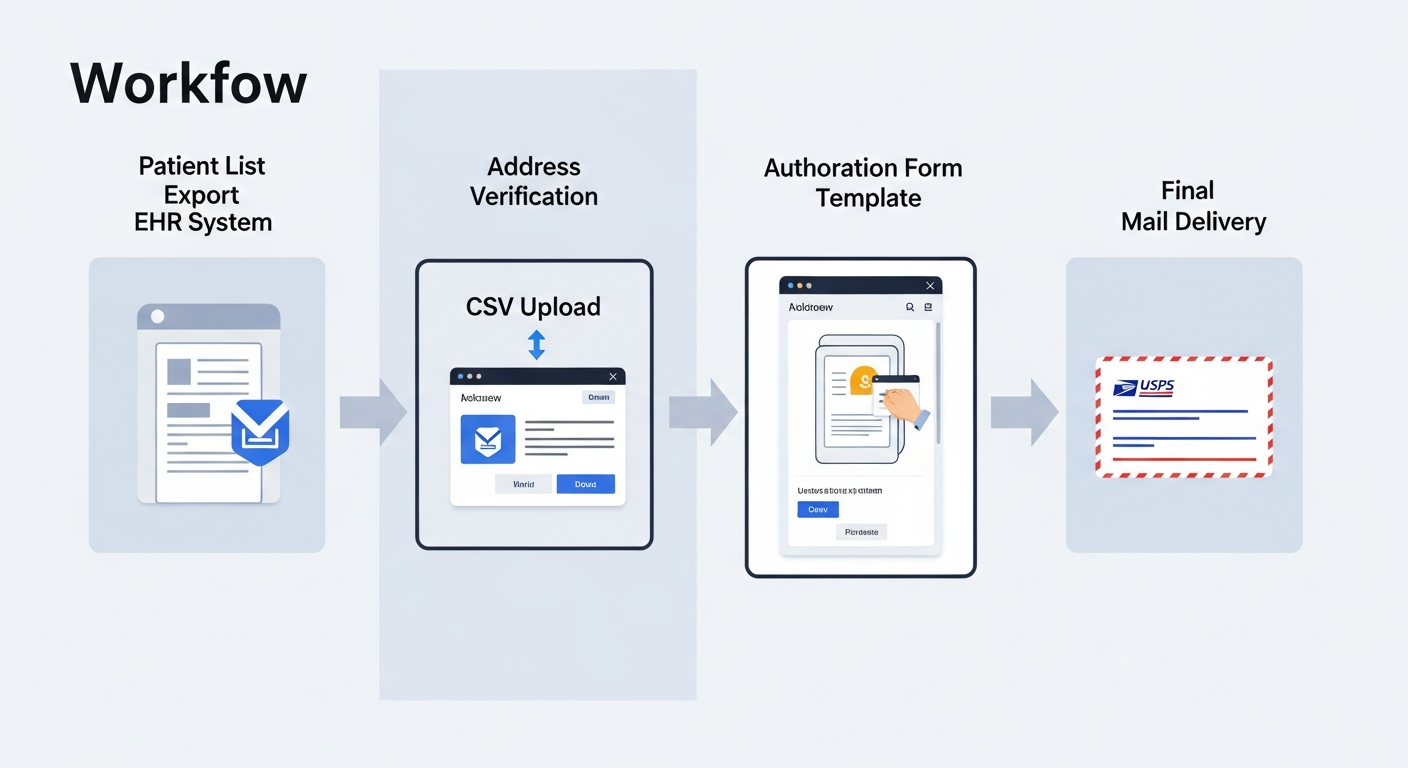
Step 1: Identify the Patient Population
Determine which patients require an authorization form and why. Export the list from your EHR or practice management system. Include only the fields needed: name, mailing address, and any variable data that will personalize the form (e.g., specific PHI categories being authorized).
Step 2: Verify and Clean Address Data
Run the list against your current records. Remove duplicates. Flag addresses that haven't been confirmed in more than 12 months. Incorrect addresses are the single most preventable cause of PHI misdirection.
Step 3: Prepare the Authorization Form Template
The form must meet all HHS-required elements under 45 CFR § 164.508. Work with your compliance officer or legal counsel to finalize the template before scaling any mailing.
Step 4: Use a BAA-Backed Mail Platform for Production
This is where many organizations make the mistake of reverting to manual processes. Printing and mailing thousands of authorization forms in-house consumes staff time, creates physical security risks during the print-stuff-seal workflow, and typically lacks a proper audit trail.
A HIPAA-compliant print-and-mail platform with a signed BAA handles the production side securely — and gives you documentation of every piece sent.
Step 5: Document Everything
Before the forms go out, log the campaign: patient count, form version, date of send, mailing platform used, and the staff member who authorized the mailing. After the send, retain any delivery confirmation data the platform provides.
Scaling Authorization Form Mailings with WriteToMail
WriteToMail is a HIPAA-compliant, SOC 2-certified platform built for exactly this type of workflow. For healthcare organizations that need to send HIPAA authorization forms by mail at scale, the platform eliminates the need to build any in-house print-and-mail infrastructure.
Here's how the workflow operates in practice:
Upload your patient list via CSV. Export your patient data from your EHR, clean the addresses, and upload the spreadsheet directly to WriteToMail. The platform supports bulk mailings to thousands of recipients simultaneously. Each CSV column maps to a variable field in your letter template — patient name, address, the specific PHI being authorized, effective dates, whatever your form requires.
Compose or upload your authorization form. You can draft the form using WriteToMail's rich text editor with variable data placeholders, or upload an existing PDF directly and have it printed and mailed. No reformatting required if you already have a finalized template.
The platform handles printing, enveloping, and USPS delivery. WriteToMail manages the full production chain — printing on appropriate paper stock, sealing in opaque envelopes, applying postage, and delivering via USPS First-Class Mail. You don't need a printer, a postage meter, or staff dedicated to stuffing envelopes.
Compliance infrastructure is built in. WriteToMail operates as a HIPAA Business Associate and maintains SOC 2-certified data handling processes. PHI uploaded via CSV is handled under the same security controls that cover other sensitive healthcare correspondence. This is the same infrastructure described in our deeper guide on HIPAA-compliant bulk mail for healthcare organizations.
For practices managing ongoing authorization workflows — not just one-time sends — WriteToMail's infrastructure means your team isn't rebuilding the process every time a new batch of forms needs to go out. The workflow is repeatable, auditable, and doesn't require IT involvement to run.
The cost model is also straightforward. Rather than absorbing the overhead of in-house printing (paper, toner, printer maintenance, staff time, postage meter contracts), you pay per piece sent — making the economics predictable and scalable whether you're sending 50 forms or 5,000. You can review current pricing at writetomail.com/pricing.
For a broader look at the compliance requirements that govern any physical mail vendor you bring into your PHI workflow, the guide on what makes a mail service HIPAA-compliant is worth reviewing before you sign any BAA.
Common Compliance Mistakes to Avoid
Sending authorization forms via unencrypted email. Even if you assume the patient "probably checks email," this is not compliant without explicit patient consent to receive PHI electronically and adequate security measures in place.
Using a print vendor without a BAA. Your local print shop cannot be your HIPAA-compliant mail partner unless they've signed a BAA. Most won't — and most don't have the security controls to back one up anyway.
Putting PHI in the envelope window. Authorization forms often include a patient's date of birth, account number, or diagnosis. A window envelope that shows any of this data is a violation. Use fully printed envelopes with no visible health information.
Mailing to outdated addresses. This is the most common cause of misdirected PHI. Build address verification into every mailing workflow, not as an afterthought.
Skipping the audit log. If you can't prove you sent the authorization form, you're exposed if the patient disputes receiving it or if a regulator asks. Every mailing should be documented before the envelopes go out the door.
Including unnecessary PHI. An authorization form requesting disclosure of one specific condition shouldn't arrive with three pages of unrelated medical history. Apply the minimum necessary standard rigorously.
FAQ
Is physical mail HIPAA-compliant by default? Physical mail is generally considered an acceptable method for transmitting PHI under HIPAA, but the process must follow appropriate safeguards — sealed opaque envelopes, correct addressing, minimum necessary PHI, and a BAA with any third-party mail vendor. The mail method itself is compliant; non-compliance comes from how the mailing is executed.
Do I need a Business Associate Agreement with my mail vendor? Yes. Any vendor that prints, handles, or transmits PHI on your behalf is a Business Associate under HIPAA and requires a signed BAA before any PHI is shared with them. There are no exceptions.
Can I email a HIPAA authorization form instead of mailing it? You can, but only if you have appropriate security measures in place (such as encrypted email or a secure patient portal) and the patient has not specifically requested physical mail. When in doubt, physical mail is the safer default.
How long must I retain copies of signed authorization forms? Under 45 CFR § 164.530(j), covered entities must retain HIPAA-related documentation for six years from the date of creation or the date it was last in effect, whichever is later. Your state may have longer retention requirements.
What happens if I mail PHI to the wrong address? Misdirected PHI is a reportable breach under HIPAA if it involves more than 500 individuals or meets the breach notification threshold. Even single-patient incidents may need to be reported and logged. This is why address verification before any PHI mailing is critical.
Can WriteToMail handle multi-page authorization forms? WriteToMail supports PDF uploads of existing documents for print-and-mail delivery, making it suitable for multi-page authorization forms. Upload your finalized PDF and the platform handles printing, enveloping, and USPS delivery.
How do I get a Business Associate Agreement with WriteToMail? Contact WriteToMail directly through writetomail.com to initiate the BAA process before uploading any patient data. This is a required step before using any HIPAA-compliant platform to send PHI.
Is certified mail required for HIPAA authorization forms? HIPAA does not specifically require certified mail for authorization forms. USPS First-Class Mail is the standard service level. Certified mail with return receipt is advisable when you need documented proof of delivery — for example, in legal proceedings or when sending breach notifications.
Sources
U.S. Department of Health & Human Services — 45 CFR § 164.508: Uses and Disclosures for Which an Authorization Is Required — Statutory basis for HIPAA authorization requirements and required form elements.
HHS — HIPAA Authorization Guidance — HHS official guidance on valid authorization elements and when authorization is required.
U.S. Department of Health & Human Services — 45 CFR § 164.502(b): Minimum Necessary Standard — Statutory basis for the minimum necessary standard applied to PHI disclosures.
U.S. Department of Health & Human Services — 45 CFR § 164.530(j): Documentation Retention Requirements — Six-year retention requirement for HIPAA documentation.
HHS OCR Breach Portal — Source for data on categories of HIPAA breach incidents, including misdirected mail.
Pew Research Center — Internet and Broadband Fact Sheet — Data on internet access rates by age group, including adults 65 and older.
USPS — Delivers Research and Insights — USPS research on physical mail engagement rates relative to email for healthcare communications.